The Genius Song Website: What You See and Where to Click
The site does not make the path to the $39 track obvious. This walk-through follows a visitor from the first page that loads to the confirmation email, with the checks that matter at each step.

Contents
- 1What you see first on The Genius Song website
- 2If you arrived from a review or an ad
- 3Getting from the front page to the Genius Song pitch
- 4Watching the presentation: the button that appears late
- 5Prefer reading? Use the text version
- 6Reading the order box
- 7At the checkout: confirm the item, the currency and the total
- 8After the payment goes through
- 9Practical tips for using the site
The Genius Song website is not built for people in a hurry. Arrive at it from almost any link and the product you came for is nowhere on the first screen; the page you actually need is one click deeper, and its order button stays hidden for the first part of a long video. This is a practical walk-through of using the site to order. It tells you what loads first, how to reach the Genius Song pitch, what the order box and the ClickBank checkout should say, and what to expect once you pay. Our notes come from visits in October 2026. We did not complete a purchase.
What you see first on The Genius Song website
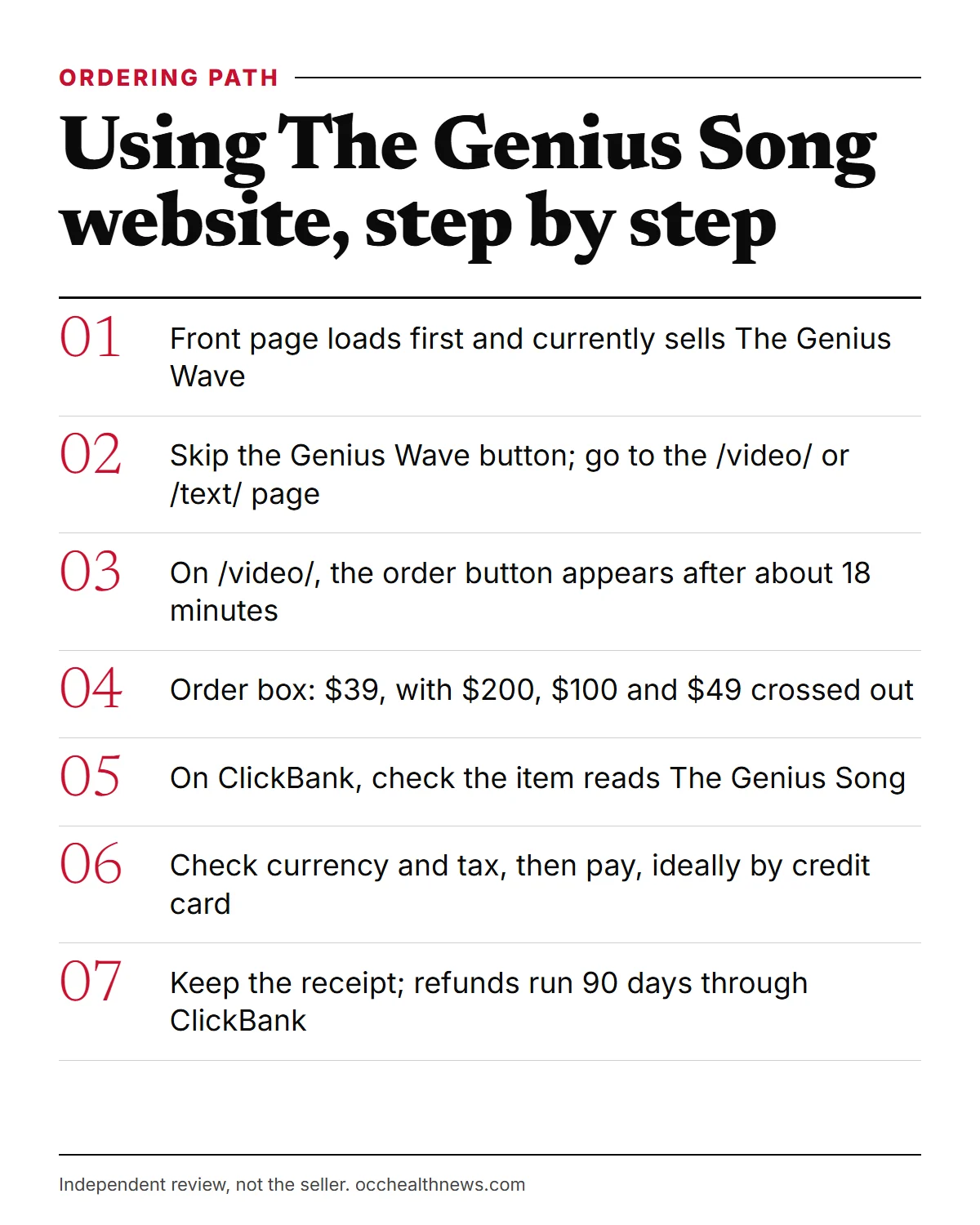
Whether you type geniussongoriginal.com or click through from a review, you land on the domain’s front page. Its browser tab says “12-Minute Audio Session”, and the headline introduces The Genius Wave, an audio the seller pitches at theta brain activity. There is a $39 price and a large button reading “Buy Genius Wave Now”.
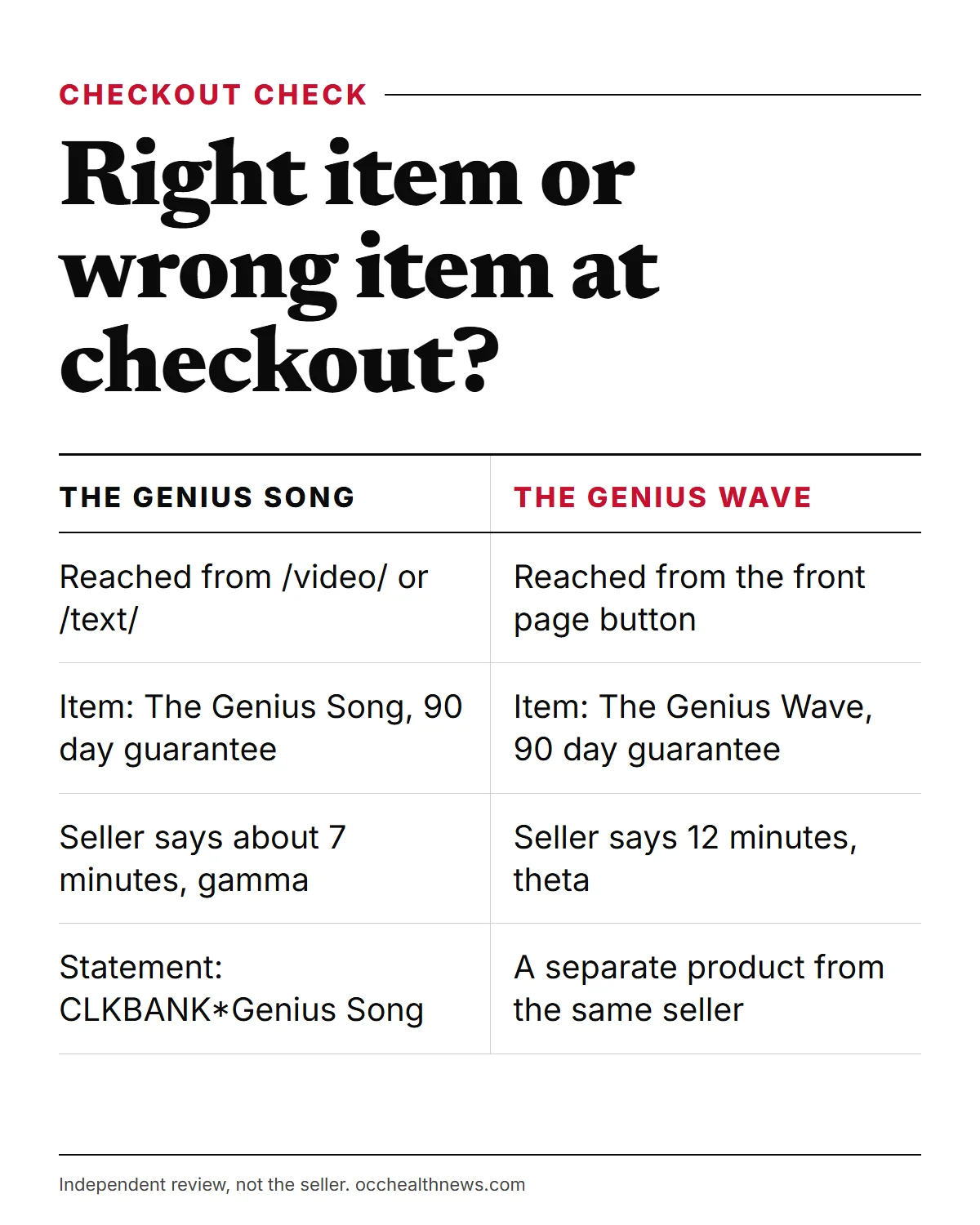
So the seller’s front page is, for now, a shop window for its related Genius Wave track, and the Genius Song pitch has been moved to the site’s /video/ page. The seller treats them as two products, with different lengths and different brainwave stories: a dozen minutes and theta for the Wave, seven minutes and gamma for the Song. Pressing the Genius Wave button takes you to a checkout for the Wave, not the Song, so do not use it if the Song is what you want.
We viewed the site from outside the US and cannot say whether American visitors are shown a different front page. Either way, the rule is the same: trust the product name on the page and at checkout.
If you arrived from a review or an ad
Most visitors reach the site through someone else’s link, ours included. Those links pass through ClickBank’s tracking redirect first and then drop you on the seller’s front page described above. The tracking code in the address does not change the price, the item or the guarantee; the ClickBank checkout shows the same $39 offer whichever way you came in.
What a link cannot do is choose the page you land on. That is set by the seller, and right now it is the Genius Wave page. So if a review or an advert promised to take you “straight to the Genius Song video”, do not be surprised to see a different product name. Treat that mismatch as a cue to slow down, not as proof that something is wrong.
Getting from the front page to the Genius Song pitch
The front page does not link to The Genius Song in any obvious way. To reach the pitch, add /video/ to the end of the domain in your browser’s address bar. If you prefer reading to watching, /text/ holds a written version of the same sales story.
Two quick signs tell you that you are on the right page. On /video/, the browser tab oddly says “The Gamma Song”, and the video’s opening promises a “seven second” brain trick. On /text/, the headline features “Tesla’s 7-Second Brain Trick” and a quote attributed to Dr. Robert Lake. That name, as the footer disclaimer on both pages admits, is a pen name, so the NASA and clinic claims attached to it are unverified.
Watching the presentation: the button that appears late
The video runs for about 39 minutes. For the first stretch there is no way to order. The page code holds the buy button back for 1,104 seconds, so it only appears a little after the 18-minute mark. That is a sales technique: by then you have heard the whole story about gamma, the colleague anecdotes and the testimonials.
Keep two things in mind while you watch. First, the testimonials are not independent reviews. The seller’s Terms say names are changed, parts of the marketing are dramatized, people may be portrayed by actors or digital avatars, some may be friends or family of the founders, and contributors were compensated. Second, the urgency lines, such as the $39 price not being “guaranteed beyond today” or your order being “set aside” for you, are pressure tactics with nothing behind them that we could check.
Prefer reading? Use the text version
The /text/ page is faster to skim, and its order boxes are visible as you scroll, without the timer. It is not an exact copy of the video, though. The headline says “19,389 Americans” have used it, while the video says 18,366, and neither figure, nor the video’s “thousands of five star reviews”, can be checked. It describes delivery as access to a “Private Audio Portal” with emailed login details, whereas the video says the track itself is emailed, and the page’s FAQ talks about downloading to your device. The seller does not say what file format you get. If the format matters to you, ask the seller’s support inbox before buying.
Reading the order box
Both Genius Song pages repeat the same order box several times. It shows “Regular Price: $200 / $100 / $49” crossed out, then “Today Just For $39”, with a line reading “(90-Day Money Back Guarantee)”. The struck-through figures are the seller’s reference prices, not amounts anyone was charged that we could find.
The bonus area is where the pages disagree most. In the video, the presenter promises three free bonuses and then describes four: The Genius Child audio for children, an old wealth book, a guided visualization from a Calm app creator and a printable habits infographic. The text page promises four bonuses worth “$197.00” and lists three, with no children’s audio. Do not let a bonus decide your purchase, since you cannot be sure which ones will arrive.
At the checkout: confirm the item, the currency and the total
Pressing the order button moves you from the seller’s domain to a ClickBank payment page for the vendor geniusbr. This is the screen to read slowly.
| What to check | What it should show for The Genius Song |
|---|---|
| Item name | The Genius Song (90-Day 100% Money Back Guarantee) |
| Item type | Digital Product, nothing shipped |
| Billing | One payment, no recurring charge |
| Currency | Your local currency, converted from $39 |
| Tax | Added according to your location |
| Statement name | CLKBANK*Genius Song |
| Wrong item warning | “The Genius Wave” means you came from the front page button |
As an example of conversion, a visit from India showed ₹4,207.93 plus ₹757.43 tax, a total of ₹4,965.36. We saw no pre-ticked extra on the checkout. Any offers that appear after payment were outside what we could test. The FTC’s general advice for online orders applies here too: pay by credit card if you can, since cards offer dispute rights for billing errors, and keep a record of the order.
After the payment goes through
ClickBank says digital access is available as soon as payment is approved. You should get a ClickBank receipt with an order number, plus delivery from the seller by email, either the track or portal login details. If nothing arrives within an hour or so, check spam and promotions folders, then contact ClickBank order support on 1-800-390-6035 or through clkbank.com. Product questions can go to [email protected], the address linked from the sales pages.
Buying also puts you on the publisher’s mailing lists. The Terms say some of those emails promote third-party offers, from numerology to the Law of Attraction; an unsubscribe link sits at the foot of each.
If the track does nothing for you, the window to ask for your money back is 90 days, set out in the Terms and printed on the checkout. Make the request through ClickBank. Do not follow the “Returns” link in the site footer: it opens a policy for NeuroActivate bottles with a 60-day limit and a postal address in Ohio, which does not fit an audio purchase.
Practical tips for using the site
- Ignore the first button you see unless you want The Genius Wave.
- Go to /video/ or /text/ for the Genius Song pitch; the text page saves you the 18-minute wait.
- Read the Terms first. They are linked in the footer as Terms & Conditions and say the products are “provided for entertainment purposes only”, which is a fair summary of how to approach the claims.
- Treat the promises as sales copy. Eureka moments, luck, money and weight loss are the seller’s claims. When a viewer credits the song with casino winnings, even the presenter allows that there is “no evidence to support that the genius song caused that”. Research on beat-based audio is mixed: a 2019 meta-analysis saw a medium average effect on some outcomes, yet most studies in a 2023 review found no brainwave entrainment, and none involved this track.
- Read the item name on the ClickBank page before entering card details.
- Save the receipt and note day 90 in your calendar.
For a fuller look at each page on the domain, our site tour covers them one by one, and our guide to the company and its contact channels explains who handles what. New to the product? Start with our plain explainer.
Frequently asked questions
I clicked a link and saw The Genius Wave. Am I on the wrong site?
Probably not. When we checked in October 2026, the seller's front page was selling The Genius Wave, a related 12-minute theta audio. The Genius Song has its own sales pages on the same domain, so the product name on the page and at checkout is what tells you which one you are buying.
Why can't I see an order button on the sales video page?
The page is coded to reveal the button only after 1,104 seconds, roughly 18 minutes into the 39-minute video. If you would rather not wait, the written version of the pitch shows its order boxes as you scroll.
Is the price on the order box the price I will pay?
The box shows $39 next to crossed-out figures of $200, $100 and $49. ClickBank then converts that to your local currency and adds any local tax, so the final figure depends on where you live.
Are there extra items or a subscription at checkout?
The checkout we saw had one digital item, no recurring billing and no pre-ticked add-on. What may be offered after payment we could not check without buying, so read any follow-up page carefully before clicking.
What happens straight after I pay?
ClickBank says access is immediate once payment is approved. The video promises an email with the track, while the written page mentions login details for an online audio portal. Expect a ClickBank receipt as well, and keep it.
Which link on the site do I use for a refund?
None of the footer links is ideal. The 'Returns' link opens a policy for NeuroActivate bottles. Instead, request a refund through ClickBank at clkbank.com or on 1-800-390-6035 within 90 days, as the Terms and the checkout allow.
Sources
- 1 Online Shopping US Federal Trade Commission, Consumer Advice
- 2 Using Credit Cards and Disputing Charges US Federal Trade Commission, Consumer Advice
- 3 How do I get a refund for a ClickBank product I have purchased? ClickBank Support
- 4 Efficacy of binaural auditory beats in cognition, anxiety, and pain perception: a meta-analysis Psychological Research · 2019
- 5 Deafness and hearing loss: Safe listening World Health Organization
About the author
OccHealthNews Editorial Team. We read the studies, guidelines and regulatory filings so you do not have to, and we show our sources on every piece. More about how we work.